Private GCS via Internal Load Balancers: No Client Auth Required

For web serving use cases it’s common to put a load balancer in front of Cloud Storage providing a custom domain name with TLS, path flexibility with a URL map, and a single place to apply policy.
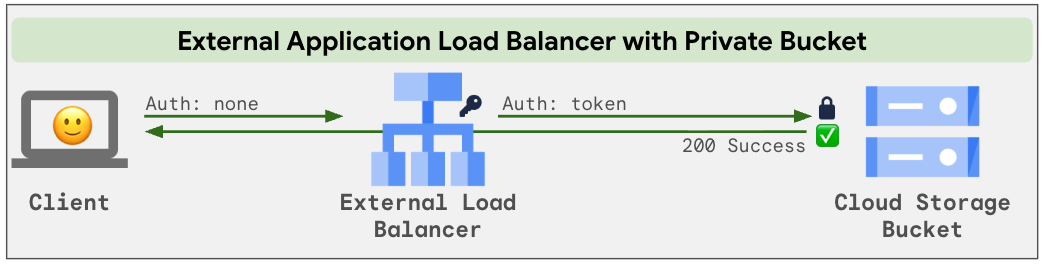
External Application Load Balancers (ALB) can use backend buckets that are shared publicly, or are kept private by granting a Google managed LB service account access. Many organizations use the private option to prevent direct API access to the bucket by unauthenticated users, as well as to avoid org policy exceptions for public access prevention and security findings that come with allUsers access.
Visually, the private option looks like this, where the External ALB adds authentication:
Great, that works for External ALBs, but what about Internal ALBs?
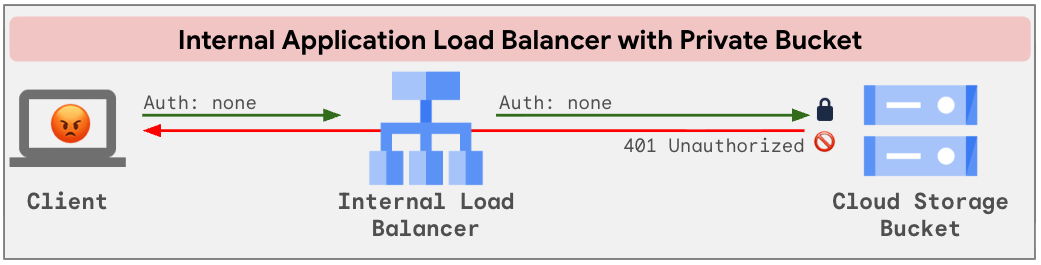
Unfortunately as of today there is no private option per the Limitations: Private bucket access isn't supported, so the backend bucket must be publicly accessible over the internet.
It sounds crazy that the bucket must be publicly available on the Internet in order to share it publicly on our internal network, but this appears to be the situation today. We can use Bucket IP filtering to block Internet access to the bucket, but from an IAM perspective it will still be open. Not good enough. Time to get cracking and see if we can build a solution that keeps the bucket private ourselves!
This is what we get out of the box with no auth headers added anywhere and a 401 response from the private bucket:
To fix this up we’ll need to add auth headers ourselves. Using a traffic extension on the forwarding rule, we’ll call a small Go ext_proc service running on Cloud Run for every request. The service holds a Cloud Storage scoped OAuth token in memory and returns a header mutation that sets authorization: Bearer <token>. The load balancer applies the header, GCS authenticates the request, and the client gets the data being none the wiser:
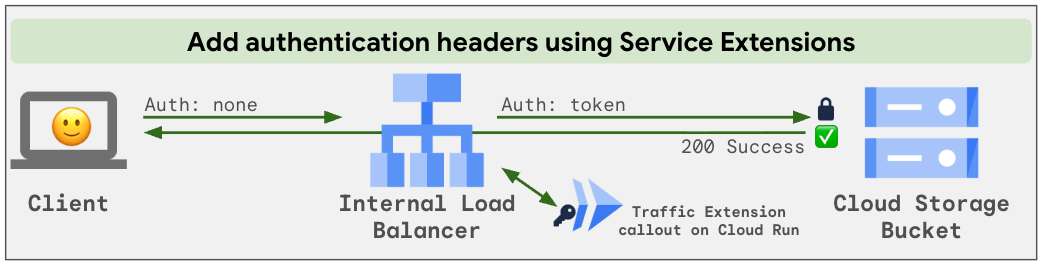
No signed URLs, no service account keys, no proxy VMs. Clients just fetch objects, and the bucket stays private.
Turning theory into practice
gcloud commands to set it up are in this GitHub repository:github.com/dutchiechris/storage/tree/main/gcs/gcs-private-bucket-callout
-
Private bucket and identity: Bucket with public access prevention enforced and the
objectViewerrole granted to a service account. -
Callout service: Under 400 lines of Go in a 5.4 MB distroless image, deployed to potentially dozens of tiny 1 vCPU / 128 MiB Cloud Run instances.
-
Load balancer: A serverless NEG and backend service for the callout, a backend bucket for GCS, and a regional internal forwarding rule in front of both.
-
Traffic extension: Attach the callout extension to the forwarding rule and configure it to process request headers only.
-
Optional HTTPS: Add a private CA, a regional managed certificate, and a private DNS zone if you want TLS and a friendly hostname.
For the how and why details, check the repo link above. The rest of this post are my “lessons learned”.
Lessons learned
1 - Don’t call the metadata server on the request path. The Cloud Run metadata server caches tokens well enough to call it per request. Or so I thought. But checking response time metrics after a 20k request test run I found response times for this cached token were 2.5 ms avg, but up to nearly 189 ms at worst. Caching the token in service RAM reduces this to under a microsecond. Considering the other steps in the callout flow take about 6 ms avg, adding latency for the token fetch itself, especially at the tail, would be impactful. Better to refresh the token in the background and serve from memory.
2 - The metadata server won’t mint a fresh token until the old one is nearly expired. The first request for a token is valid for 30 minutes. Request another five minutes later and you get that same token with 25 minutes remaining. So at what point does the metadata server mint a new one? Through my testing, at 4 minutes remaining. I added refresh logic to save it to service RAM at 3 minutes remaining to avoid slowing any client request.
3 - Go sees 2 CPUs, but it turned out not to matter. runtime.NumCPU() returns 2 on 1 vCPU and sub-vCPU instances because the container is scheduled across two logical hyperthreads. However, on a 1 vCPU allocation, if your Go runtime runs two OS threads concurrently at full load, it will be throttled introducing latency jitter, degrading throughput, and potentially triggering Adaptive Concurrency Tuning (ACT) that reduces request concurrency. Suspecting this was hurting performance, I wrote code to inspect cgroup quotas and set Go’s GOMAXPROCS accordingly.
While testing with Cloud Run Gen1 (gVisor-based virtualization), I found that cpu.cfs_quota_us did not reflect limits accurately when CPU boost was enabled; it continued reporting the boosted quota even after the startup period expired. Looking for other options, I found cpu.shares reliably showed 1024 shares per configured vCPU regardless of boost (e.g., 512 for 0.5 vCPU, 2048 for 2 vCPU).
Under Cloud Run Gen2 (microVM-based execution), the behavior flipped: cpu.cfs_quota_us accurately tracked the active CPU quota, decreasing after the boost period ended. But now cpu.shares appeared to be fixed at 1024 regardless of instance size or boost state.
This was starting to get quite complicated, so I decided to measure the impact of setting GOMAXPROCS to 1 or 2 in the first place. For my workload, I couldn’t see any difference: same scaled instance count, comparable CPU utilization, and equivalent response times. So I deleted the code. Tuning likely pays off when you have more CPUs or are purposefully saturating CPU, but for this workload where 1 vCPU runs at around 30% utilization, it doesn’t really matter.
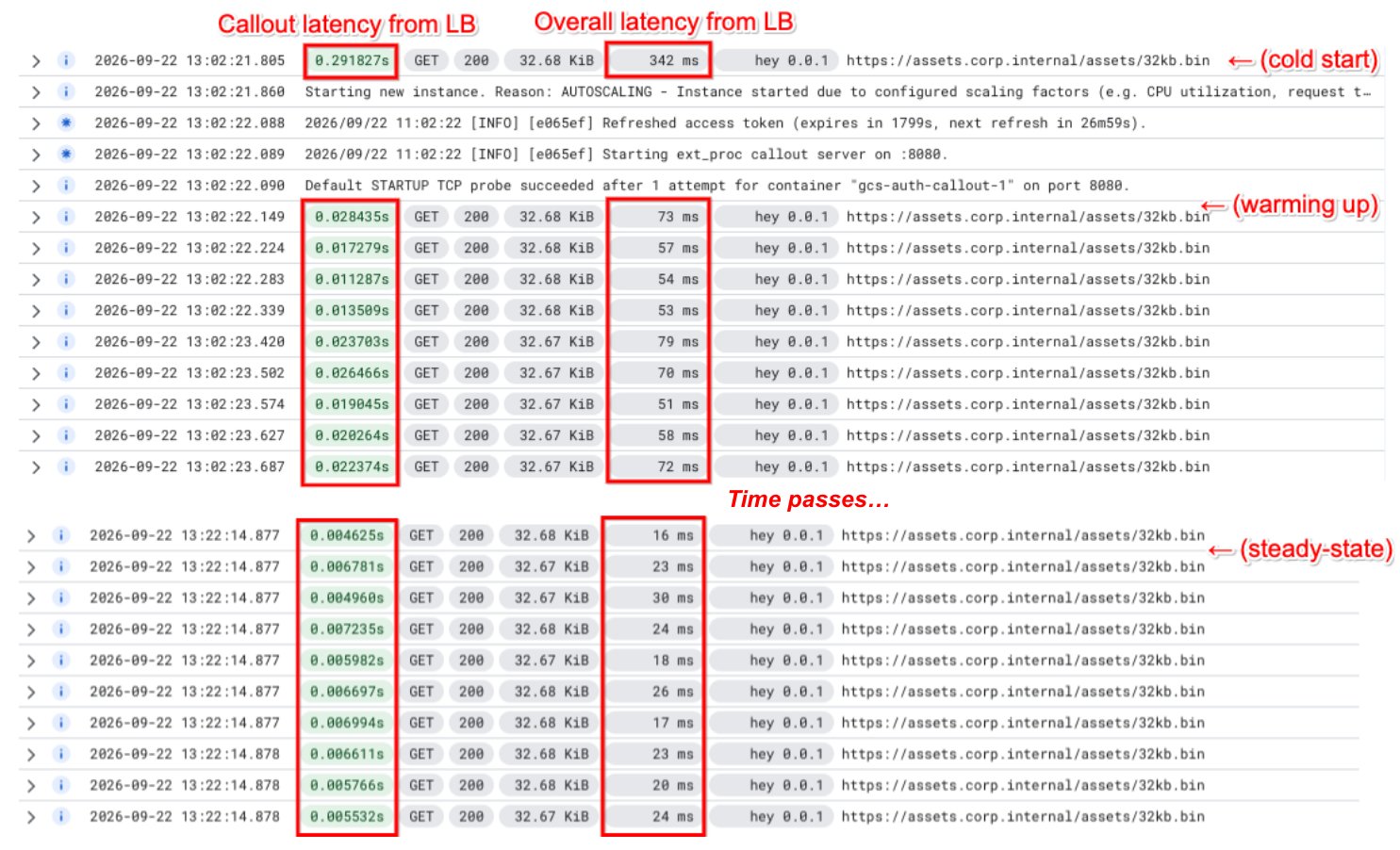
4 - The solution scales up smoothly, and the additional callout latency is minor. With a 32 KiB file and 100 concurrent clients fetching it from a GCE VM in the same region I observed around 3,800 req/sec @ 25 ms avg response time with 6 Cloud Run instances active. Quadrupling the clients to 400 increased serving to 12,750 req/sec @ 28 ms avg response time with 14 instances serving. At both load points the callout latency contributed under 6 ms to the overall latency and I didn’t see a single HTTP error. These results are once things were warmed up, but even from a cold start (e.g. --min-instances=0) the very first request had total latency of 342 ms, and the immediate requests thereafter at around 70 ms:
5 - Stop guessing why Cloud Run scaled. Coming from an infra background I was interested in testing different Cloud Run shapes to find the best price/perf. Initially, my approach was to test with --min-instances=1 to see how much throughput, and at what latency, I could get from a single instance. Next, I’d extrapolate the needed instance count for my workload. Don’t do this. Cloud Run’s autoscaler is more advanced and uses multiple signals to scale and distribute work. Instead of the extrapolation, start your benchmark and then check the Cloud Monitoring recommended instances metric label scaling_driver. It will show you how many instances are needed on a per scaling driver basis. During tests with 100 and 400 clients system was always the greatest value, and two scaling elements I’d been investigating were off the table: neither --concurrency nor act was anywhere near producing a scaling decision:
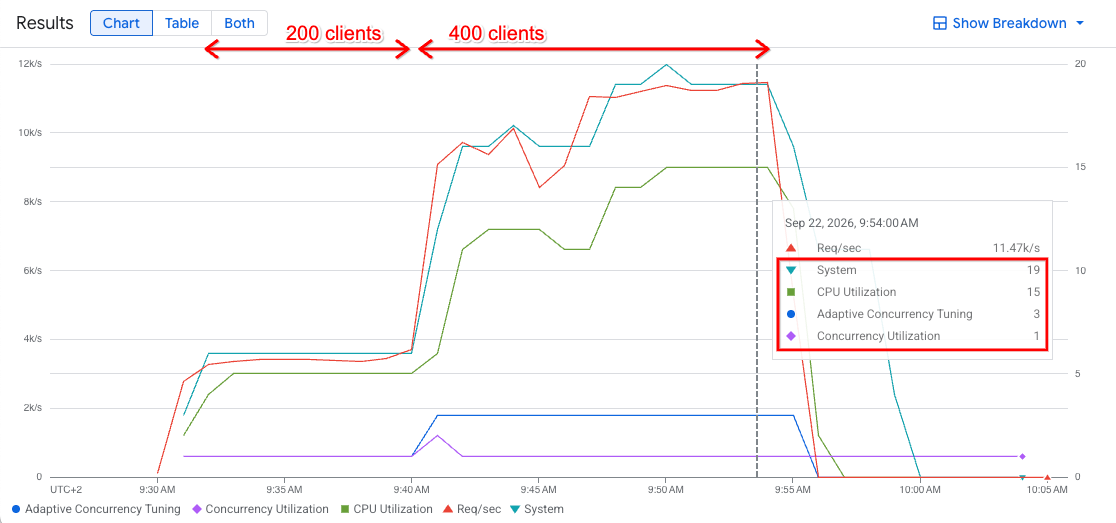
6 - Upsizing resources bought nothing. I doubled vCPU to use a 2 vCPU / 128 MiB instance to check the impact on latency, per-instance throughput, and instance count scaling. First, the System scaling_factor was unchanged and still leading, so it woudln’t run any fewer instances. Next, I analyzed service latency and throughput, and they were comparable too. Usually bigger is better, but in this case it made no difference and would nearly double the cost.
7 - As request rates get higher, the bucket will be your temporary constraint. Cloud Storage ramps a bucket up gradually, starting at around 5,000 object reads per second. In my test I naturally scaled past 5,000 and hit some errors, 429s and 5xxs mostly, while the bucket was ramping. If you see higher latency or errors be sure to evaluate the full chain: ALB, Callout, and Storage bucket. And especially when testing request bursts, or higher request levels, make sure your bucket is warm.
What about security?
The Envoy service extension does not provide any authentication when streaming requests to the callout. As a consequence, the Cloud Run service has to be deployed with --allow-unauthenticated. To reduce access make it internal using --ingress=internal and remove endpoints using --no-default-url. Even so, any client inside the VPC that can reach the callout can get a token back. To limit the blast radius, make the token itself less useful:
- Least privilege IAM: Grant the service account read access to the one bucket and nothing else.
- Downscoped token: Scope the token to
devstorage.read_onlyto ensure even if permissions are expanded the token can’t be used with them.
Conclusion
This solution leverages specific features of storage, networking, and serverless compute to meet a business requirement. While the code that adds an auth token will hopefully be replaced by a built-in feature soon (like it is for External ALBs), the callout design pattern itself is adaptable for other use cases where headers need to be manipulated, or request details logged.
gcloud commands to set it up are in this GitHub repository:github.com/dutchiechris/storage/tree/main/gcs/gcs-private-bucket-callout
Use a disposable project, run through it, and see how it fits your environment! As always, comments welcome below.